nFront Password Filter Client
Overview
The latest client for nFront Password Filter supports Windows 7, 10, and 11. See the nFront Password Filter Documentation for complete details on client installation and configuration.
The client is optional (i.e. nFront Password Filter will still filter passwords even if you do not deploy the client). The client offers the following benefits:
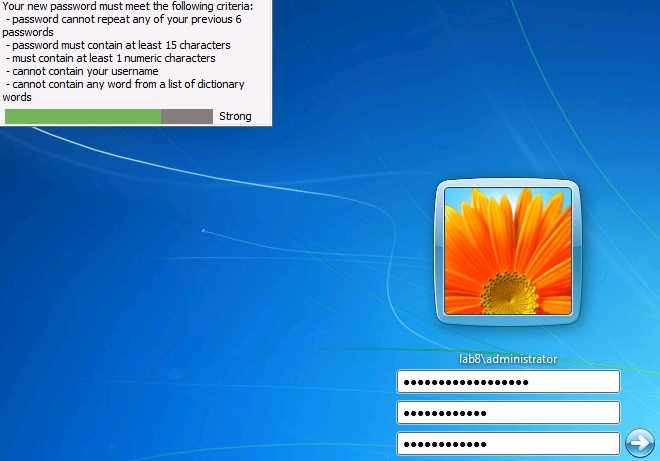
- Modifies the Password Change dialog box to show the list of password policy rules that apply to this specific user account
- Provides a more detailed failure message to the end user if he or she types a password that does not meet the requirements
- Provides an optional password strength meter to help the user select a strong password.
- **Provides password expiration warning message at logon if the user's password is within the expiration warning interval and approaching expiration due to to nFront max password age settings.
**The password expiration notification at logon is not currently supported when the client is installed on Windows Vista or Windows 7. The support will be added in a future release.
Installation
The client can be installed on any client OS from Windows 7 through 11 and any server OS from Windows Server 2012 through Server 2025. . A reboot is not required since logon credential providers can be added dynamically.
The client can be deployed automatically via a softare GPO just like any other MSI software package. If deployed as an administrative / silent installation a reboot of the client is not triggered. Thus, the client will immediately affect any Windows client or server OS since a reboot is not required.
Client requires nFront Password Policy service from product version 4.14 or later
The client uses an encrypted RPC call to communicate with the nFront Password Policy Service on Domain Controllers. Thus, you must install nFront Password Filter version 4.14 or later on all domain controllers or you may keep your earlier version and simply replace the nFront Password Policy Service with the newer version for client support. In the download package below you will find the nFront Password Policy Service file and instructions on how to replace the file on your domain controllers.
Screenshots - Windows 7 (with optional Strength Meter)